# Spieler-shops
1. Platziere eine Kiste oder ein Fass. Letztere empfehlen sich bei großen Shops, da diese weniger Lags bei Spielern verursachen.
2. Bringe ein Schild an der Kiste/dem Fass oder neben der Kiste/dem Fass an.
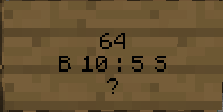
3. Beschrifte das Schild wie auf dem Bild gezeigt (Achtung: die erste Zeile muss leer bleiben!).
4. Klicke mit dem Item auf das Schild. Fertig!
1. Zeile: Freilassen
2. Zeile: Anzahl
3. Zeile: Preis
4. Zeile: Fragezeichen (?)
\`B\` = Item-Verkaufspreis, \`S\` = Item-Ankaufspreis
Du kannst nur einen Verkaufs- oder Ankaufspreis oder beide Preise mit einem `:` in der Mitte angeben.
---
# Agent Instructions: Querying This Documentation
If you need additional information that is not directly available in this page, you can query the documentation dynamically by asking a question.
Perform an HTTP GET request on the current page URL with the `ask` query parameter:
```
GET https://cyreawiki.gitbook.io/cyreawiki/wirtschaft/spieler-shops.md?ask=
```
The question should be specific, self-contained, and written in natural language.
The response will contain a direct answer to the question and relevant excerpts and sources from the documentation.
Use this mechanism when the answer is not explicitly present in the current page, you need clarification or additional context, or you want to retrieve related documentation sections.